Suleymaniye Mosque · Visitor Guide

Parking around the Mosque

Check nearby parking zones, view our illustrated street maps and understand Blue Badge, bank holiday and red-route restrictions before you travel.

212–216 Kingsland Road, London E2 8AX
No visitor parking on mosque premisesUse a lawful on-street bay or nearby paid parking. Street signs, bay markings, suspensions and TfL red-route restrictions always take priority over this guide.

Before you park: Read the street and bay signs, and look for any parking suspension notices.

Zone F · London-time parking guide

Checking London time…

This reflects normal zone hours, not the availability or legality of an individual space.

Checking…

Check a date and time

Nearby parking zones

ZONE F · MOSQUE

Hoxton / Haggerston

Mon–Fri: 08:30–18:30

Saturday: 08:30–13:30

Sunday: Normal controls not operating

Outside these times, ordinary zone-controlled bays may be unrestricted; check individual signs.

Blue Badge: parking in eligible bays during and outside control hours. Blue Badge conditions ↓

Paid parking during controls · RingGo ↓
ZONE H

De Beauvoir

Mon–Fri: 08:30–18:30

Saturday: Normal controls not operating

Sunday: Normal controls not operating

Based on the mosque's zone guide. Verify any bay-specific hours.

Blue Badge: parking in eligible bays during and outside control hours. Blue Badge conditions ↓

Paid parking during controls · RingGo ↓
ZONE J

Nearby streets

Mon–Fri: 08:30–18:30

Saturday: Normal controls not operating

Sunday: Normal controls not operating

Always check the signs and look for any parking suspension notices before you park.

Blue Badge: parking in eligible bays during and outside control hours. Blue Badge conditions ↓

Paid parking during controls · RingGo ↓

Explore our parking maps

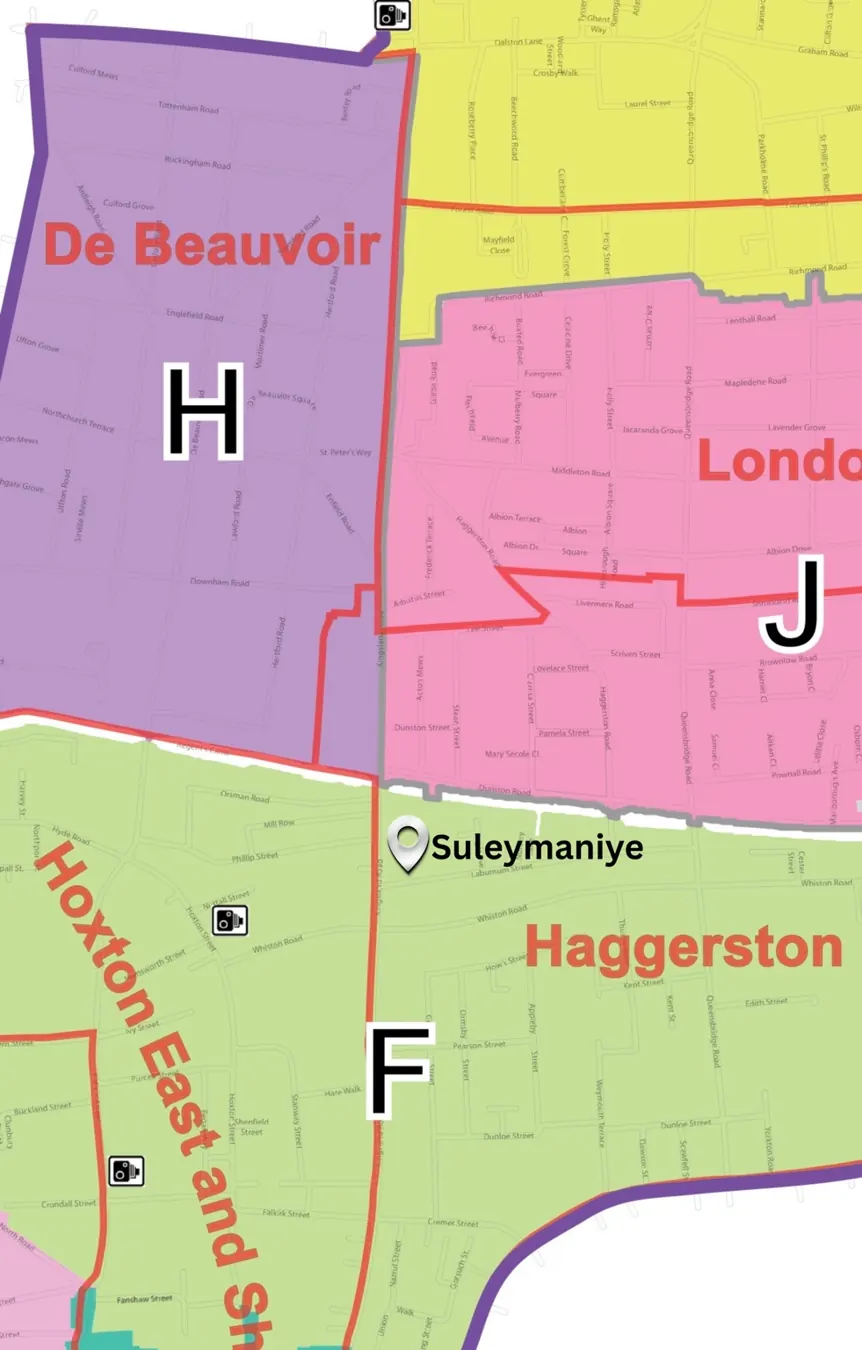
Use these illustrated maps to identify the surrounding controlled parking zones and the single-red-line areas highlighted in the mosque's guide.

Illustrated controlled parking zone map showing Suleymaniye Mosque and nearby zones F, H and J

Where are the parking zones?

Zone F includes the mosque. The map also shows nearby Zone H (De Beauvoir) and Zone J.

  • Zone F Saturday controls normally end at 13:30.
  • Zones H and J are shown as normally unrestricted on Saturdays in the mosque's guide.
  • Follow the signs for the exact bay where you park.

Illustrative map supplied by Suleymaniye Mosque; not a live parking availability map.

Special parking rules

BLUE BADGE · HACKNEY TRIAL THROUGH SEPTEMBER 2027

Where Blue Badge holders may park

A Blue Badge allows free, unlimited parking in eligible pay-and-display and shared-use bays; follow posted time limits in general disabled bays. Eligible “Permit holders only” bays are also covered by the current trial. These concessions apply during control hours too. Display your Blue Badge and use the parking clock where a time limit applies. Suspensions and special-bay restrictions still apply.

Temporary trial (started 2 March 2026): Hackney allows a valid Blue Badge in on-street bays signed “Permit holders only” (bays open to all permit types). Following its September 2026 review, Hackney extended the trial for a further 12 months; it will review the arrangement again.

A Blue Badge alone does NOT permit parking in bays signed “Resident permit holders only”, “Business permit holders only”, “Estate permit holders only”, or personalised disabled permit bays. Do not confuse “Permit holders only” with “Resident permit holders only”.

Other Blue Badge permissions: free use of on-street pay-and-display bays, shared-use pay-and-display bays and general-use disabled bays (follow any posted time limit). Eligible single or double yellow lines: up to 3 hours where no loading/unloading ban applies; display both badge and clock, do not obstruct, and do not return to the same road for one hour after leaving.

Hackney companion e-badge: a separate concession for eligible Hackney residents in their home zone; do not assume visitors with an ordinary Blue Badge have those additional rights.

Check Hackney's official Blue Badge rules ↗

BANK HOLIDAYS · ON-STREET BAYS

Parking restrictions not in operation on bank holidays

Unless the exceptions below apply, Hackney does not enforce bank holiday restrictions in these bays and will not issue a PCN to vehicles parked in them:

  • resident or shared use (resident permit or pay and display) bays
  • pay and display bays
  • business permit holder bays
  • doctors bays
  • loading bays
  • market trader permit bays
  • motorcycle bays

Exceptions and continuing controls

Exceptions: enforcement continues for safety, traffic flow or obstruction. Special event controls may apply in zones G, G2 and parts of M near Emirates Stadium, and in the Queen Elizabeth Olympic Park/London Stadium event area. This exemption does not cover private or estate parking.

Other restrictions still apply: yellow lines when in force, loading bans, disabled and Blue Badge bays, suspended bays, bus stops, pavement parking, dropped kerbs and other safety restrictions. TfL red-route rules are separate. When Boxing Day falls on Saturday or Sunday, normal weekend enforcement applies on that date.

Hackney bank holiday enforcement policy ↗

TFL RED ROUTE

Single red lines · after 19:00 and before 07:00

The supplied map highlights specific single red line stretches where parking is indicated as possible after 19:00 and before 07:00.

Do not assume every red line is available: double red lines, marked bays, loading rules and different signs can change what is allowed. TfL CCTV enforcement operates nearby.

YELLOW LINES · CHECK SIGNS

Single and double yellow lines

Do not use yellow lines as visitor parking. Hackney can enforce applicable yellow-line restrictions on any day, including Sundays and bank holidays. The absence of kerb marks does not cancel a waiting restriction.

Without a Blue Badge: double yellow lines prohibit waiting 24 hours a day, 7 days a week (no sign is required). Single yellow lines prohibit waiting during the hours shown on the nearby sign or controlled-zone entry sign — they are not automatically 24/7, although an individual single yellow line may have an all-day restriction. Outside their operating hours, waiting may be permitted unless another restriction applies.

With a Blue Badge: on eligible single or double yellow lines, you may generally park for up to 3 hours with your Blue Badge and parking clock correctly displayed, only when no loading/unloading ban applies and you do not obstruct traffic. No return to the same road within one hour.

Loading is different from parking: genuine loading/unloading may be permitted on yellow lines where no loading ban applies, but this is not free visitor parking. Yellow kerb marks indicate loading restrictions: double kerb marks mean no loading at any time; single kerb marks mean no loading during the times on the sign. No kerb marks does not mean the yellow line is free parking. Genuine loading must be necessary and not simply a visit to the mosque.

Bank holidays: Hackney can still enforce yellow-line restrictions where they are in force. Always read the signs and markings.

Official yellow-line and loading rules ↗

Helpful links

Please park responsibly. This guide is based on the mosque's supplied parking PDF, maps and additional local guidance. It is not a live council database, and the checker only evaluates normal Zone F hours. Individual signs, permit requirements, bank holiday notices, suspensions, yellow-line restrictions, disabled parking conditions and TfL red-route controls take precedence. The map annotations are illustrative and may become outdated. No parking space is guaranteed.
A QUICK LOCAL OPTION

Pick up a bike. Leave your own at home.

Lime and Voi both operate in Hackney, where the mosque is located. Their apps show available bikes and approved parking areas. Availability changes throughout the day.

Electric assistance

Make a short local journey with less pedalling effort. Useful for the last part of a bus or train journey.

No personal lock to carry

Use the bike’s own system and follow the app’s locking instructions. There is no personal bicycle to leave outside while you pray.

A one-way ride is fine

Return it to an approved hire-bike bay, rather than the exact place you collected it. End the ride properly before walking away.

Less worry about leaving your own bike outside — but no promise that a hire bike cannot be stolen. You remain responsible for following the operator’s terms until the ride is properly ended.
SHORT RIDES, CLEARER COSTS

A plan can make regular trips cheaper.

Compare the monthly fee as well as the ride price. These examples are not unlimited free riding: each qualifying trip still costs £1.70. For an occasional journey, check pay-as-you-go pricing or a minute bundle in the app.

LimePrime
£6.99 / month
£1.70 / ride up to 20 minutes

Membership fee plus a separate charge for each ride.

  • £1 for rides up to 5 minutes
  • Free unlocks on every ride
  • Free reservations for up to 30 minutes

Plan example from the app screenshot supplied on 31 October 2026. Confirm your own offer before subscribing.

Voi+
£2.99 / month
£1.70 / ride up to 20 minutes

Membership fee plus a separate charge for each ride.

  • Free reservations for up to 30 minutes
  • Pause a ride for up to 10 minutes free under this offer
  • Renews monthly — cancel in the app

Plan example from the app screenshot supplied on 31 October 2026. Confirm your own offer before subscribing.

What would a month cost?

Example only: monthly fee + £1.70 × rides. Extra time, other charges and account-specific offers are excluded.

LimePrime£20.59£6.99 + 8 × £1.70
Voi+£16.59£2.99 + 8 × £1.70
Live price check: offers may vary by account and location. Check renewal, cancellation, over-20-minute charges and any unlock fees in the app before paying. A pause is not the same as ending a ride.

First time? Four simple steps.

01

Find

Open either app. Check a bike’s battery, the route and a permitted bay near your destination before unlocking.

02

Unlock

Check the price, scan the QR code and follow the app. Check brakes and tyres before riding.

03

Ride

Use suitable roads and cycle routes, obey signals and do not ride on pavements. Wear a helmet and allow extra time.

04

Park & finish

Use an approved hire-bike bay, keep access clear, follow the locking/photo steps and wait for the app’s end-of-ride confirmation.

PARK WITH CONSIDERATION

Find a bay before you arrive.

Hackney requires hire bikes to be returned to a cycle hire bay, with a parking photo. Do not leave one at the mosque entrance, across a dropped kerb or where it blocks pedestrians. Incorrect parking can lead to warnings or charges.

Official Hackney hire-bike bay map

Load the council’s interactive map to explore bays. This is a parking map, not a live bike-availability map. Use Lime or Voi for current bike locations and permitted returns.

Loading connects to Hackney Council’s map service.
Allow a short walk from a suitable bay. No specific bay or bike availability is guaranteed outside the mosque.

Live in Hackney? Check local discounts first.

The council lists resident schemes for both operators, plus support for eligible groups. Compare these with a subscription before buying; proof of eligibility may be needed.

See Hackney resident offers ↗

Before you set off

Leave time to park before prayer

Check today’s prayer and opening times. Allow time to find a legal bay, finish the rental and walk to the mosque.

What if the bay is full or the app will not end the ride?

Find another permitted bay or contact the operator through the app. Do not leave the bicycle assuming billing has stopped; check for an end-of-ride confirmation.

Phone, battery and accessibility

You need a charged phone, mobile data and a supported payment method. Check the operator’s riding eligibility. If cycling or station access is unsuitable, plan an alternative and contact the mosque about access needs.

No affiliation with Lime or Voi. Prices are plan examples supplied on 31 October 2026; current app terms take precedence.

PARKING WHILE CONTROLS ARE ACTIVE

Find paid parking with RingGo

During control hours, look for eligible pay-and-display or shared-use bays. Search E2 8AX or Kingsland Road in the RingGo app or parking map.

  1. Check the bay type, the RingGo location code on its sign and the maximum stay.
  2. Select the correct vehicle registration and review the price and any optional service charges before paying.
  3. Confirm your parking session has started before leaving the vehicle. Paying through RingGo does not authorise parking in permit-only or suspended bays.

The map helps locate RingGo parking; it does not guarantee a vacant space. Current street signs take priority. Free parking conditions for Blue Badge holders ↑